
ATkeyboard(앹키보드)2.0.0 - Google Play
You'll be able to see results in few seconds.
Publisher Description

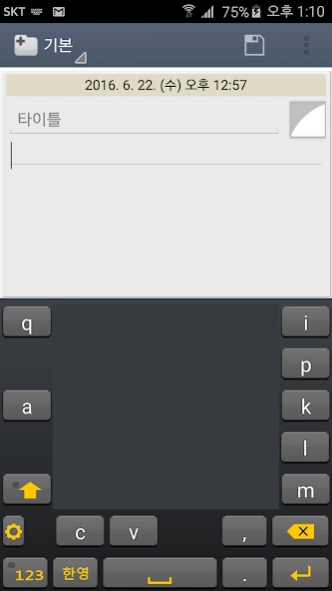

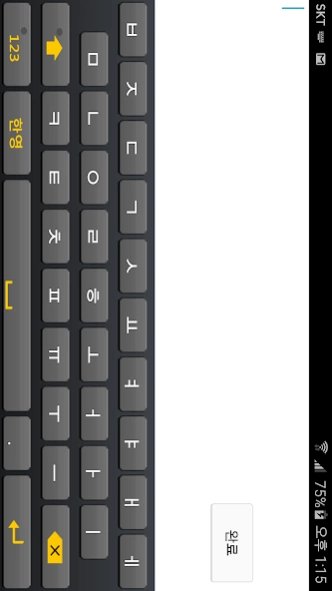
A new concept keyboard ATkeyboard (aet keyboard) = qwerty two lines to prevent the frequent typos due to the small size of the keyboard in portrait mode
★★★★★ portrait mode, a new concept keyboard ATkeyboard (aet keyboard) to prevent the frequent typos due to the small size of the keyboard in QWERTY ★★★★★ two lines =
♣♣♣ app commentary ♣♣♣
▶ 'Tenchijin' Hangul, etc. The unique keyboard is fast and convenient, but if cooked in hand, hit several times much more QWERTY keyboard, regardless of the speed, and the consecutive "number of cases" letters varies depending on the speed generated value.
▶ They have been developed to implement the Hangul is not a typo in a small cell phone, according to people familiar with the PC QWERTY smartphone, the latest increases will use the QWERTY lot in mobile phones.
▶ However, the "portrait mode" that use a lot in a text message, email, SNS and still has a QWERTY keyboard, the size of a small typo frequently offset by the benefits.
▶ Unlike QWERTY PC's mobile phone Qwerty even so many fingers instead of one, using only two fingers because there is no QWERTY keyboard that corresponds to the finger, meaning the ATkeyboard by varying the arrangement while using the keys of the same number and QWERTY individual the advantage of increasing the size of the QWERTY key to dramatically reduce the chance of typos is utilized.
▶ The benefits apply equally as well as English and Hangul symbols, foreign characters.
▶ The app will be familiar with the PC QWERTY, but I do think that a lot of typos especially useful for seniors or those who simply want those three distinct functions.
▶ QWERTY arrangement, but some changes will be immediately familiar and intuitive look endures because it is used many times.
Features of the app ♣♣♣ ♣♣♣
1. avoid typos in portrait mode (Anti-Typo) function
- In portrait mode, widely used in mobile phones to the horizontal width of the individual keys Since this can be generous and easy to grow nearly twice typos
2. In portrait mode, the convenience of using the same number key and Qwerty keyboard
- For the Qwerty keyboard and the same number of individual keys can also be minimized by Hangul input number
- Use the user accustomed to the convenience to the Qwerty keyboard and the Qwerty keyboard layout similar
- Familiar with the Qwerty keyboard, but the keyboard is a little uncomfortable to optimize your keyboard
- In portrait mode also offers a variety of symbol characters by default
3. In the AT keyboard in portrait mode! In landscape mode, the Qwerty keyboard! (Automatic switching)
- Rotates from portrait mode while using the AT keyboard automatically switches to landscape mode when the keyboard Qwerty
4. easy to use as a keyboard-driven basic functions
- Using a complex rule out additional functionality and simplified Sikkim focused on basic functions
5. Installation and Usage
- Set the default keyboard, keyboard input preference - Language & input 'to' ATkeyboard 'After installing the app,
- Click the Preferences icon in the ATkeyboard get help that can change the Skin, vibration, sound], etc.
About ATkeyboard(앹키보드)
The company that develops ATkeyboard(앹키보드) is c.s.park. The latest version released by its developer is 2.0.0.
To install ATkeyboard(앹키보드) on your Android device, just click the green Continue To App button above to start the installation process. The app is listed on our website since 2016-07-23 and was downloaded 0 times. We have already checked if the download link is safe, however for your own protection we recommend that you scan the downloaded app with your antivirus. Your antivirus may detect the ATkeyboard(앹키보드) as malware as malware if the download link to org.ATkeyboard is broken.
How to install ATkeyboard(앹키보드) on your Android device:
- Click on the Continue To App button on our website. This will redirect you to Google Play.
- Once the ATkeyboard(앹키보드) is shown in the Google Play listing of your Android device, you can start its download and installation. Tap on the Install button located below the search bar and to the right of the app icon.
- A pop-up window with the permissions required by ATkeyboard(앹키보드) will be shown. Click on Accept to continue the process.
- ATkeyboard(앹키보드) will be downloaded onto your device, displaying a progress. Once the download completes, the installation will start and you'll get a notification after the installation is finished.
Program Details
System requirements
Download information
Pricing
Version History
version 2.0.0
posted on 2016-07-23
Version 2.0.0 (2016.7.)
- 반응속도 개선
- 키보드 자체에 작은 ‘설정’키를 추가함
Version 1.5.0
- 그레이와 화이트의 2가지 스킨모드 설정
- 키를 누를 때 프리뷰 사용, 진동발생, 소리발생 메뉴 추가
- 환경설정 메뉴 추가
Disclaimer
Official Google Play Link
We do not host ATkeyboard(앹키보드) on our servers. We did not scan it for viruses, adware, spyware or other type of malware. This app is hosted by Google and passed their terms and conditions to be listed there. We recommend caution when installing it.
The Google Play link for ATkeyboard(앹키보드) is provided to you by apps112.com without any warranties, representations or guarantees of any kind, so access it at your own risk.
If you have questions regarding this particular app contact the publisher directly. For questions about the functionalities of apps112.com contact us.
